
BILL OS · Cash, staff and control
A day close that balances, and staff who see their own job
Open the drawer with the change you start with, record cash in and out with a reason, and close with a count. Each login sees only what its role allows.
How it works
Step by step, and why each step matters.
Each step says what the software does, then what it means for your business.
- 01
Open with a float
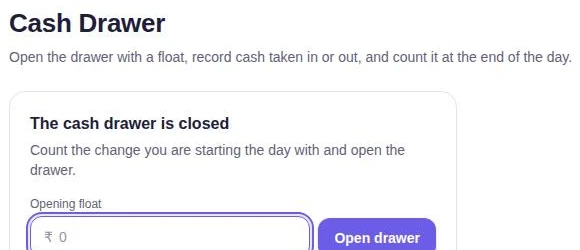
Each store has one drawer shift. Enter the opening float to open it.
Every shift starts from a known amount.
- 02
Record cash in and out
Pay-ins and pay-outs are recorded with a reason. Cash paid to suppliers comes out of the drawer too.
Cash that leaves the drawer is explained.
- 03
Close with a count
Count by notes and coins or by total. Expected cash is worked out from the float, cash payments, exchange cash, expenses and pay-ins and pay-outs. Staff count blind, and any difference is flagged.
A short drawer is found the same day, not at month end.
- 04
Give each person a role
Owner, admin, manager, accountant or cashier, plus view-only logins. Permissions are checked by the server, even when the screen hides a button.
A cashier can bill without being able to change prices, settings or past records.
In the software
What it looks like.
Screens from BILL OS, running with demo data.
Worth knowing
The details that matter.
Payments never counted twice
Shift boundaries are recorded precisely, so a payment never lands in two shifts.
Supplier accounts
Each supplier has a ledger with a running balance and payments against a bill or on account.
Questions
About cash drawer, staff and permissions.
Can an accountant see several businesses?
Yes. A login can be given access to another business and switch between them; access is checked on every request.
Does BILL OS open the cash drawer automatically?
No. BILL OS prints through Windows printing and does not send a drawer-kick command.
Related
More from BILL OS.
- BILL OSBilling and checkoutEvery step a cashier repeats has a key, so a sale can go from customer to receipt without touching the mouse, even with a queue at the counter.
- BILL OSReports, exports and GuardianReports read the same records the counter writes, so the owner sees today while there is still time to act, and the accountant gets files they can use.
Guides on this topic
See cash drawer, staff and permissions in BILL OS.
Ask for a demo on your own products and workflow. From ₹499 a month.