
Solutions · Restaurants
The till, the kitchen and the floor on one system.
A restaurant’s orders move from the counter to the kitchen and back while the table waits. DINE OS keeps the till, kitchen, floor and stock on one system.
The product for this
DINE OS
The till, the kitchen, tables, menu and stock in one system for a food business.
From ₹999 a month
The problems
Where the day goes wrong for restaurants.
- 01
Tickets lost on the way to the kitchen
Paper KOTs go missing and late orders are noticed by the customer first.
- 02
Tables nobody is watching
Which table is waiting to pay, and which is being cleaned, is only visible on the floor.
- 03
Food cost is a guess
Ingredients are used without a record, so waste and theft are invisible.
- 04
A close that never balances
Takings and the drawer disagree, and nobody knows why.
A working day
How it fits into the day.
An outline of a realistic day. Your own routine will differ.
- 01
Before service
Open the register with a float, check low stock and switch off items you cannot serve.
- 02
Service
Start orders from tables or the counter; tickets appear on the kitchen screen by station.
- 03
After service
Record waste, receive the evening delivery against its purchase order.
- 04
Close
Count the register and read the day’s sales by channel and item.
Features
The features that matter here.
Documented capabilities, each explained on its own page.
- DINE OSRestaurant till and order hubThe till sends items and quantities, and the price always comes from the menu. Every order, whatever the channel, lands in one list.
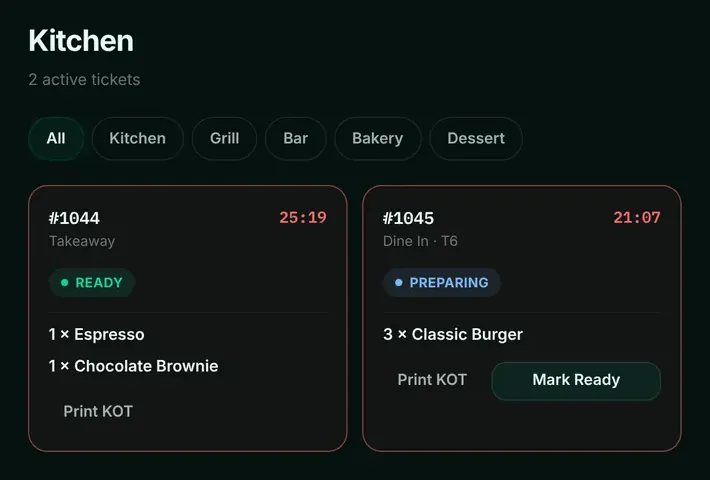
- DINE OSKitchen display and KOTsOrders appear on the kitchen screen the moment they are placed, filtered by station, with a timer that makes late tickets obvious.
- DINE OSTables and dine-inEvery table on one board, coloured by status, so the floor staff and the counter see the same picture.
- DINE OSRestaurant stock and purchasingEvery sale deducts its recipe’s ingredients on the server the moment it settles, so stock on hand reflects what the kitchen actually used.
Hardware and setup
What you will need.
A computer for the server and till, a screen for the kitchen if you want one, and receipt and KOT printers.
Questions
Common questions.
Does it work for takeaway and delivery too?
Yes. Dine-in, takeaway and delivery orders share one order hub.
Guides
Useful reading.
- Guide · 8 min readWhat Is Restaurant Management Software? Features and How It HelpsRestaurant management software is one system for the till, the kitchen, the tables, the menu, the stock room and the cash drawer. Here is what each part does, how they connect and which parts your format actually needs.
- Guide · 9 min readThe Restaurant Order Workflow: From Order to Paid Without GapsMost restaurant problems happen in the gaps: between the counter and the kitchen, the kitchen and the table, the table and the till. A clear order workflow, with one owner for every step, closes those gaps.
- Guide · 7 min readHow to Calculate Restaurant Food Cost: Formula + ExampleFood cost has two versions: what a plate should cost according to its recipe, and what the kitchen actually used over a month. Calculating both, and comparing them, shows where money leaks.
Tell us how your business runs.
Ask about DINE OS for your business: availability, pricing and a demo where available.