
DINE OS · Restaurant operations
A floor board of every table
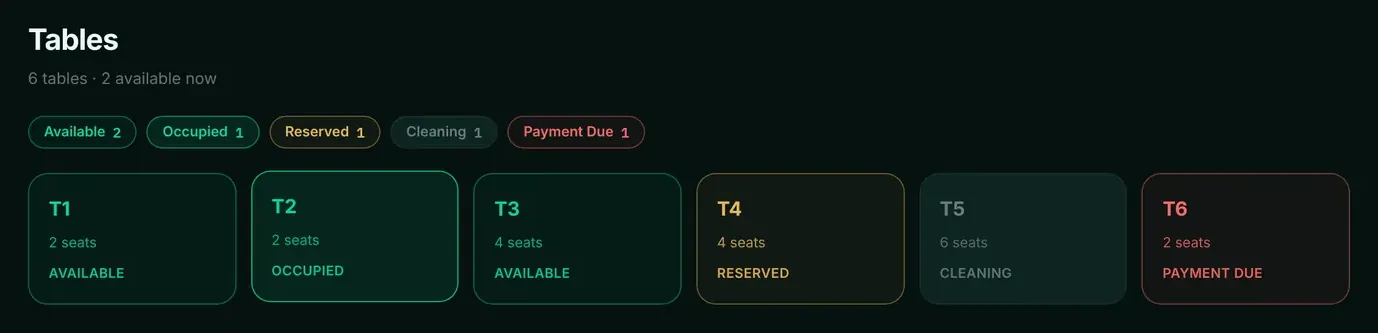
Every table on one board, coloured by status, so the floor staff and the counter see the same picture.
How it works
Step by step, and why each step matters.
Each step says what the software does, then what it means for your business.
- 01
See the floor
Tables show as available, occupied, reserved, cleaning or payment due, with live counts.
A host can seat guests without walking the floor.
- 02
Start from the table
Open an order from an available table; the table is marked occupied on the shared board.
Orders and tables stay linked.
- 03
Cook while the bill is open
A dine-in order is sent to the kitchen while the bill stays open for more items.
Guests can keep ordering without starting a new bill.
- 04
Pay, then clean
After payment the table moves to cleaning, not straight back to available. Staff reset it once it is clean.
No guest is seated at a table that has not been cleared.
In the software
What it looks like.
Screens from DINE OS, running with demo data.
Related
More from DINE OS.
- DINE OSRestaurant till and order hubThe till sends items and quantities, and the price always comes from the menu. Every order, whatever the channel, lands in one list.
- DINE OSKitchen display and KOTsOrders appear on the kitchen screen the moment they are placed, filtered by station, with a timer that makes late tickets obvious.
Guides on this topic
See tables and dine-in in DINE OS.
Ask for a demo on your own products and workflow. From ₹999 a month.