
DINE OS · Restaurant operations
One order list for the counter, tables and deliveries
The till sends items and quantities, and the price always comes from the menu. Every order, whatever the channel, lands in one list.
How it works
Step by step, and why each step matters.
Each step says what the software does, then what it means for your business.
- 01
Take the order
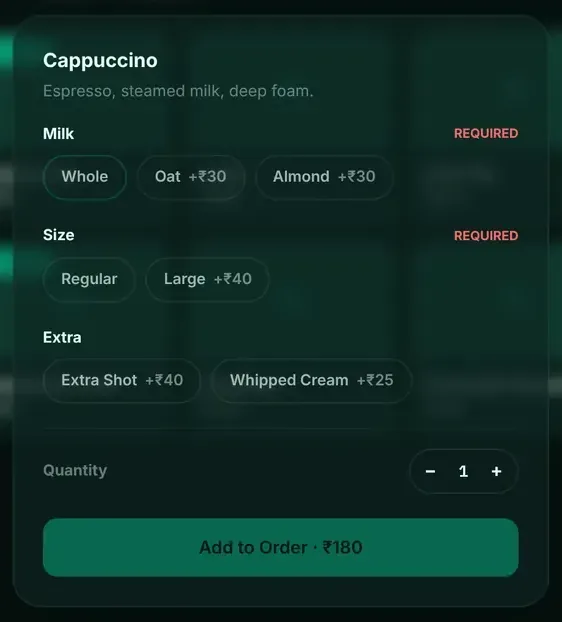
Pick dine-in, takeaway or delivery, add items, and choose modifiers such as milk, size or extras. Required choices must be made before the item is added.
Orders reach the kitchen complete, with nothing left to guess.
- 02
Priced by the menu
The server prices every line from its own menu data, including modifiers, and checks quantities.
A price cannot be typed in or tampered with at the counter.
- 03
Follow it through
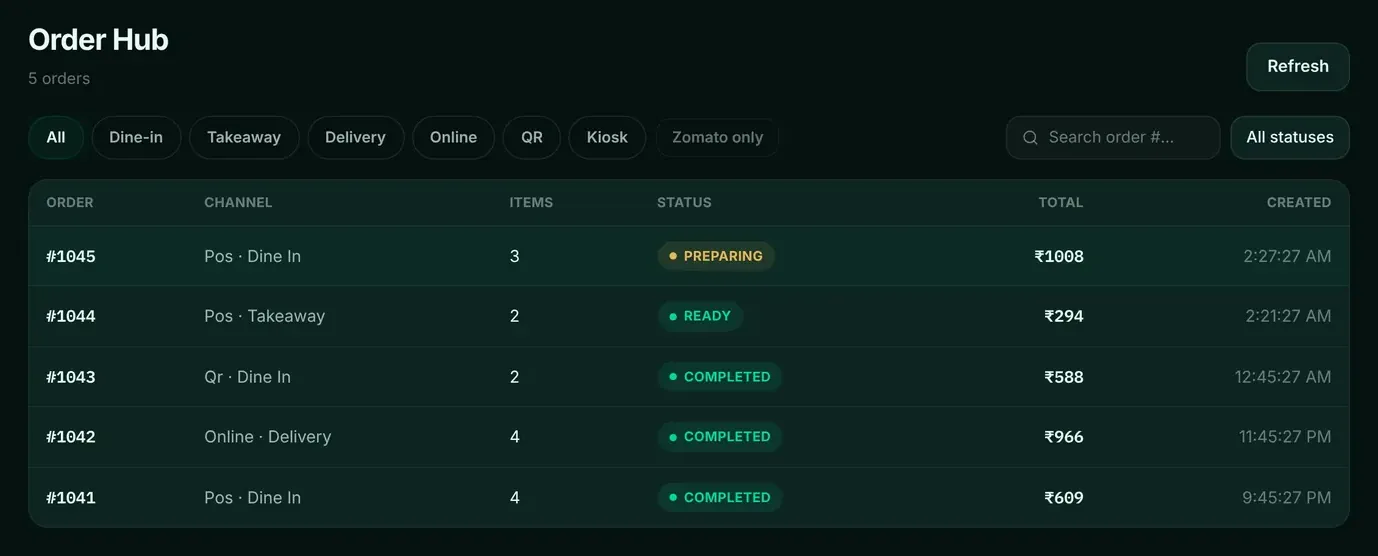
The order hub shows every order with its channel, items, status and total, filtered by channel and status.
The counter knows which orders are ready without asking the kitchen.
- 04
Cancel or refund by role
Cancellations and refunds are limited by role: a cashier’s refund is refused, an owner’s goes through.
Money does not leave the till without the right person.
In the software
What it looks like.
Screens from DINE OS, running with demo data.
Worth knowing
The details that matter.
Keeps selling when the server drops
If the till cannot reach the server, a sale is queued on the device and sent when the server is back.
Questions
About restaurant till and order hub.
Does DINE OS take orders from delivery apps?
Do not choose DINE OS for delivery-platform order intake today. Ask us about your platforms.
Does it take card payments directly?
Ask us. Payment gateway use needs your own merchant account.
Related
More from DINE OS.
- DINE OSKitchen display and KOTsOrders appear on the kitchen screen the moment they are placed, filtered by station, with a timer that makes late tickets obvious.
- DINE OSTables and dine-inEvery table on one board, coloured by status, so the floor staff and the counter see the same picture.
- DINE OSMenu and recipesThe menu is the source of truth for prices, tax, kitchen stations and ingredients. Change it once and the till, kitchen and stock follow.
Guides on this topic
- Guide · 8 min readRestaurant POS Software: A Complete Guide for OwnersBuying a restaurant POS is part software, part hardware and part planning. This guide covers what to look for, what to plug in, what to ask about cost and how to set it up without disrupting service.
- Guide · 9 min readHow Restaurant Billing Software Works: Orders, KOTs and BillsA restaurant bill is the last step of a chain that starts with the menu. This guide follows one table's order through every step the software takes, with the actual tickets and numbers.
- Guide · 9 min readThe Restaurant Order Workflow: From Order to Paid Without GapsMost restaurant problems happen in the gaps: between the counter and the kitchen, the kitchen and the table, the table and the till. A clear order workflow, with one owner for every step, closes those gaps.
See restaurant till and order hub in DINE OS.
Ask for a demo on your own products and workflow. From ₹999 a month.