

BILL OS · Billing, stock and GST software for retail shopsBusiness, in order.

Billing, stock, payments, customers and GST in one fast system that runs on a computer in your shop. Phones and tablets on the same network can use it too.

From ₹499 a month. See plans.

Runs on
A Windows computer in your shop
Payments
Cash, UPI, card, split
Tax
GST bills, credit notes, GSTR-1 export
Exports
Excel, CSV, Tally XML
01

A sale, start to finish, without touching the mouse.

BILL OS is built for the counter at six in the evening. Every step a cashier repeats has a key, and the shortcuts are on the screen.

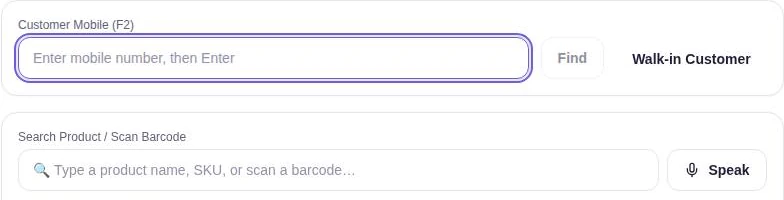
  1. F2 Find the customer

    Type their mobile number, or bill a walk-in customer.

  2. Add the items

    Scan a barcode, search by name or SKU, or add by voice with Speak.

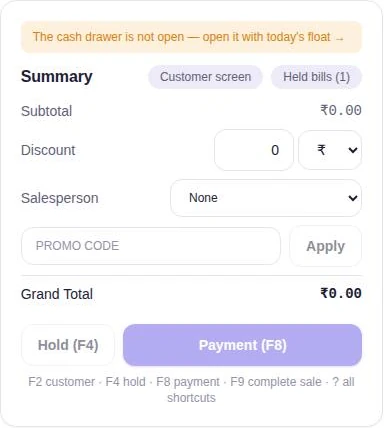
  3. F4 Hold, if you need to

    Park the bill and serve the next person. Held bills wait in their own list.

  4. F8 Take payment

    Cash, UPI, card, or split across more than one.

  5. F9 Complete the sale

    The receipt prints, stock updates and the customer’s balance is current.

BILL OS sales screen: a Customer Mobile (F2) field with Find and Walk-in Customer, and a product search that also accepts a barcode scan, with a Speak button.
BILL OS bill summary: subtotal, discount, salesperson, promo code, grand total, Hold (F4) and Payment (F8), with the shortcut list below.

Product screens from BILL OS, shown with demo data.

How billing and checkout work

02

What BILL OS does.

Every capability listed here is documented and tested in BILL OS. Each group links to a page that explains how it works.

At the counter

  • Find the customer by mobile number, or bill a walk-in
  • Scan a barcode, search by name or SKU, or add by voice
  • Hold a bill and pick it up later
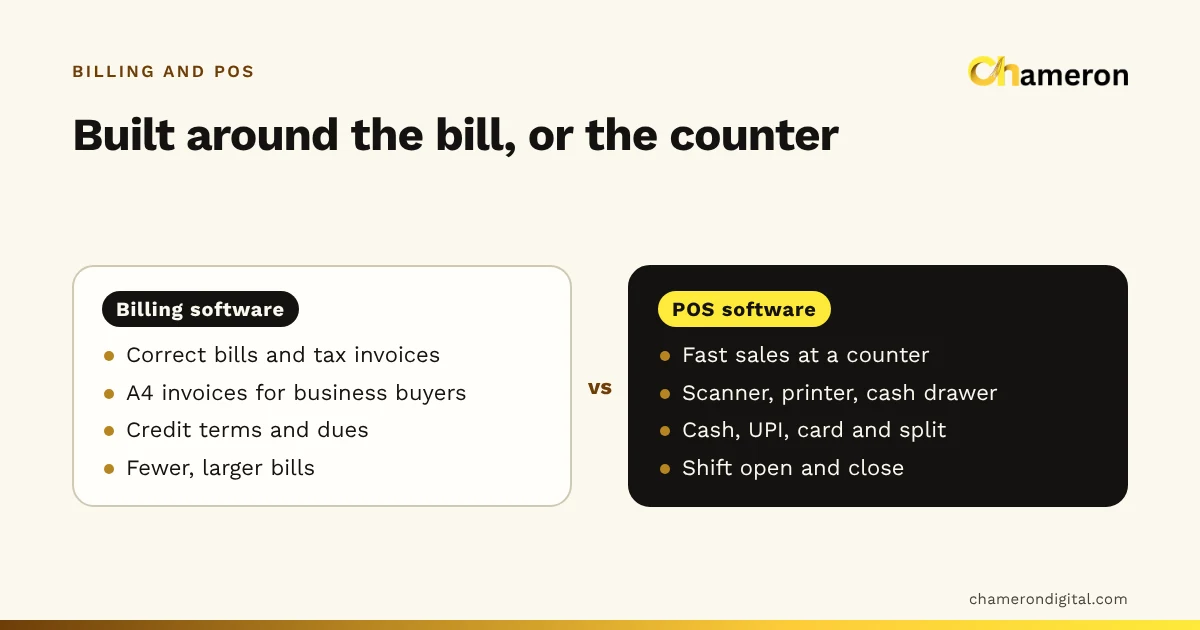
  • Cash, UPI, card or split payment, with change worked out
  • Thermal receipts on 58 mm or 80 mm rolls, and A4 bills
  • A customer-facing second screen
Billing and checkout

Products and stock

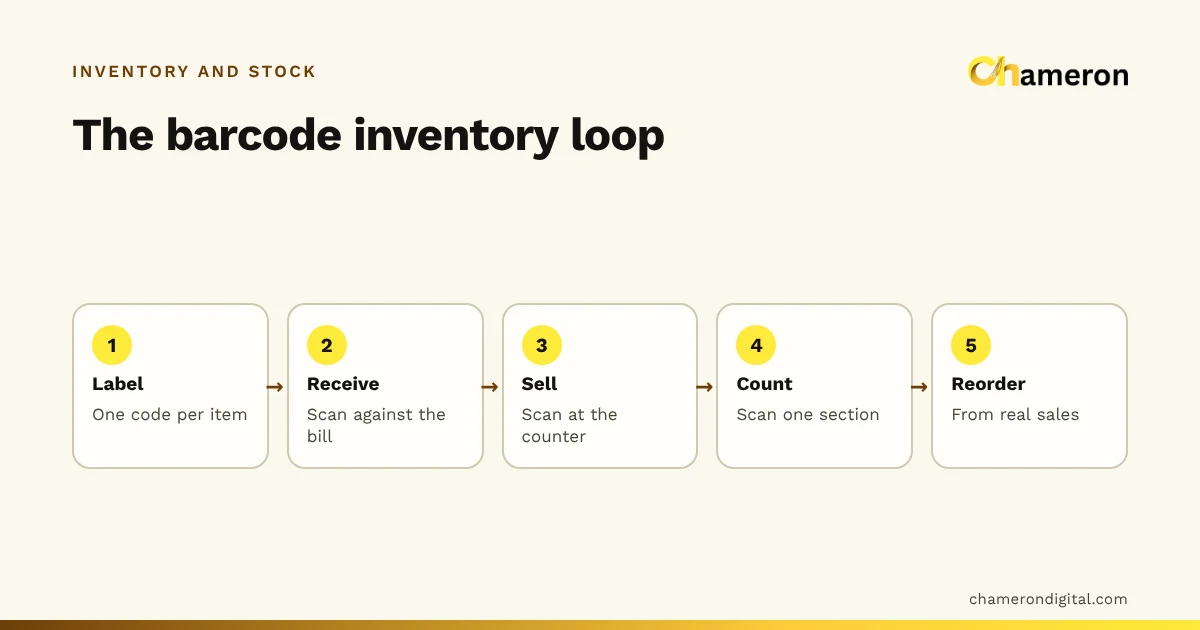
  • One stock ledger for sales, returns, receiving and counts
  • Stock receiving against the supplier’s bill, with damaged units set aside
  • Stock tally: count the shelves, then approve the differences
  • Batch and expiry, used first-expiry-first
  • Stock per store for businesses with more than one
Inventory and stock

SKUs, barcodes and labels

  • SKUs made automatically and never repeated
  • In-store EAN-13 barcodes, or your existing codes
  • Sizes and colours as variants, each with its own SKU, barcode and price
  • Labels on thermal rolls (50 × 25 or 38 × 25 mm) or A4 sheets
  • Import products from Excel or CSV, checked row by row first
SKUs, barcodes and labels

Returns, exchanges and GST

  • Exchanges and returns against the original bill
  • GST credit notes for returned goods
  • GST optional per business, with place of supply (IGST)
  • GSTR-1 CSV export in the offline-tool layout
  • Supplier returns recorded as debit notes
GST, returns and exchanges

Customers and credit

  • Each customer’s bills, balance and loyalty points
  • Credit with reminders sent on WhatsApp
  • Promo codes and offers for a customer or customer type
  • Sales credited to a salesperson, with commission
Customers, credit and loyalty

Reports and exports

  • Sales, profit, payments, margins, sizes and colours, dead stock
  • Every report downloads as Excel or CSV
  • Tally XML of sales and receipt vouchers
  • Guardian: discounts, sales below cost and short drawers to review
Reports, exports and Guardian

Cash, staff and control

  • Open the drawer with a float, close it with a count
  • Roles for owner, admin, manager, accountant and cashier
  • Permissions checked by the server, not just hidden on screen
  • Supplier accounts with a running balance
Cash drawer, staff and permissions

Backups and recovery

  • Automatic daily backups, plus before every upgrade and restore
  • Every backup verified with a checksum
  • A second copy to another drive or synced folder
  • Restore keeps a safety copy of what it replaces
Backups and recovery

Every number, from your live records.

Reports read the same records the counter writes, and export to Excel, CSV or Tally XML for your accountant.

BILL OS reports screen with Excel, CSV and Tally export buttons and report tabs.

Open with a float. Close with a count.

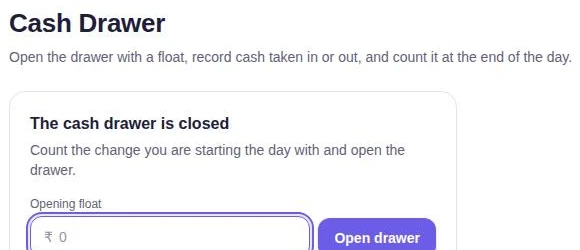
The cash drawer opens each day with the change you start with, records cash taken in or out, and is counted at closing. A short drawer is flagged.

BILL OS cash drawer screen: enter an opening float and open the drawer.
03

Guardian: what needs a second look.

Guardian reads your own records and lists what is worth checking. Most items have an ordinary reason. Each one links to the bills behind it.

  • Cancelled bills
  • Big discounts
  • Sales below cost
  • Short cash drawers
  • Overdue credit
  • Stock about to run out
BILL OS Guardian screen listing items to review for the last 7 days, starting with discounts of 20% or more.
Product screen from BILL OS, with demo data.
04

Built to be relied on.

A billing system is only as good as its worst day. These are the checks BILL OS is built and tested against.

1,000,000

bills in a synthetic test shop

In our own benchmark on a generated shop with 1,000,000 bills and 500,000 customers, customer search by name took 13 milliseconds (median of five runs). Real shops and computers will vary.

Verified

backups, before you need them

See what each backup holds and check it. A tampered or incomplete backup fails verification and is never restored.

Copied

your data, before any restore

A safety copy is taken first, so a restore can never leave you worse off than before.

Rehearsed

failures, with every test run

Destroy-and-restore and a stop in the middle of a sale are rehearsed by automated drills.

How backups and recovery work

06

Requirements and installation.

Installed like any Windows program, for the signed-in user, with no administrator password. Installation guide · Hardware guide

Computer
A Windows 10 (version 1903 or later) or Windows 11 computer, 64-bit, with about 450 MB free
Also needed
Microsoft Edge WebView2 Runtime (installed by the setup if missing) and .NET Framework 4.8
Other devices
Phones, tablets and other computers on the same network open BILL OS in a browser while it is running on the main computer
Internet
Not needed for billing. Needed for WhatsApp messages and for updates
Printers
Any printer Windows can print to: thermal receipt rolls (58 or 80 mm), label rolls, or A4
Scanners
Barcode scanners that type into the focused field; camera scanning on phones in Chrome
07

BILL OS pricing.

Prices are per month, for a subscription to use the software. What each plan includes is confirmed with you before you pay. Applicable taxes and charges are stated at payment or on your invoice.

Starter

₹499/month

Ask us what Starter includes for your shop before you buy.

Ask about Starter Pay by invoice

Growth

₹999/month

Ask us what Growth includes for your shop before you buy.

Ask about Growth Pay by invoice

Pro

₹1,999/month

Ask us what Pro includes for your shop before you buy.

Ask about Pro Pay by invoice

Before you pay. Subscriptions may automatically renew at the applicable renewal price unless cancelled before the renewal date. Cancelling stops the next renewal; access you have already paid for continues to the end of that period. You can request a refund within 15 days of purchase, subject to the Refund Policy. Applicable taxes and charges are stated at payment or on your invoice.

Online checkout on this website is not switched on yet. To buy, ask about a plan or request an invoice, and we will confirm the details with you.

08

Questions owners ask.

Does BILL OS need the internet?

No, not for billing. BILL OS runs on a computer in your shop. WhatsApp messages and updates need a connection when they run.

What computer does it need?

A Windows 10 (version 1903 or later) or Windows 11 computer, 64-bit, with about 450 MB free. The setup installs Microsoft Edge WebView2 if it is missing. See system requirements.

Can I use it on a phone or tablet?

Yes. Phones, tablets and other computers on the same network open BILL OS in a browser while it is running on the shop computer.

Does it handle GST?

BILL OS records GST on bills, issues GST credit notes for returns and exchanges, records supplier returns as debit notes, and exports GSTR-1 data. Filing stays with you and your accountant. Live e-invoicing and e-way bill generation are not available for production use, so do not choose BILL OS for live e-invoicing or e-way bills today.

Can it run more than one store?

Yes. A business can have several stores, each with its own bills and numbering, sharing products and customers, with stock per store if you turn it on.

Can I move my existing products in?

Yes. Import from Excel or CSV, including sizes and colours, batch and expiry. Every row is checked in a preview first.

How much does it cost?

Starter ₹499, Growth ₹999, Pro ₹1,999 a month. Ask us what each plan includes before you buy. See pricing.

How do I get it?

Request software access and tell us about your shop. Installers are not offered for public download; see downloads.

What happens to my data if the computer fails?

BILL OS takes automatic backups, verifies each one, can copy them to a second location such as a USB drive, and keeps a safety copy before any restore. Keep a copy of your backups off the shop computer.

See BILL OS on your own products.

Tell us what you sell, how many counters you run and what you use today, and ask whether BILL OS fits the way your shop works.

Contact us

Online sending is not switched on yet. Fill in the form and use Send by email, or chat with us on WhatsApp. Nothing you type is sent until you choose.

Mobile number
How should we contact you?

What you sell or run, what you use today, and what you would like to know.

We use these details only to reply to this enquiry, by the method you choose. Fields marked * are required. Buying? See payment, auto-renewal and refund terms.