The short answer
A restaurant order workflow is the fixed path every order follows: placed, preparing, ready, served, paid and cleared. Each of those states should be visible to everyone and owned by one person at a time. Most lost, late or wrongly billed orders do not fail inside a step; they fail at a handoff, when one person assumes another has the order. Design the handoffs, route each item to the right station, and the rest of the service gets calmer.
The six states of an order
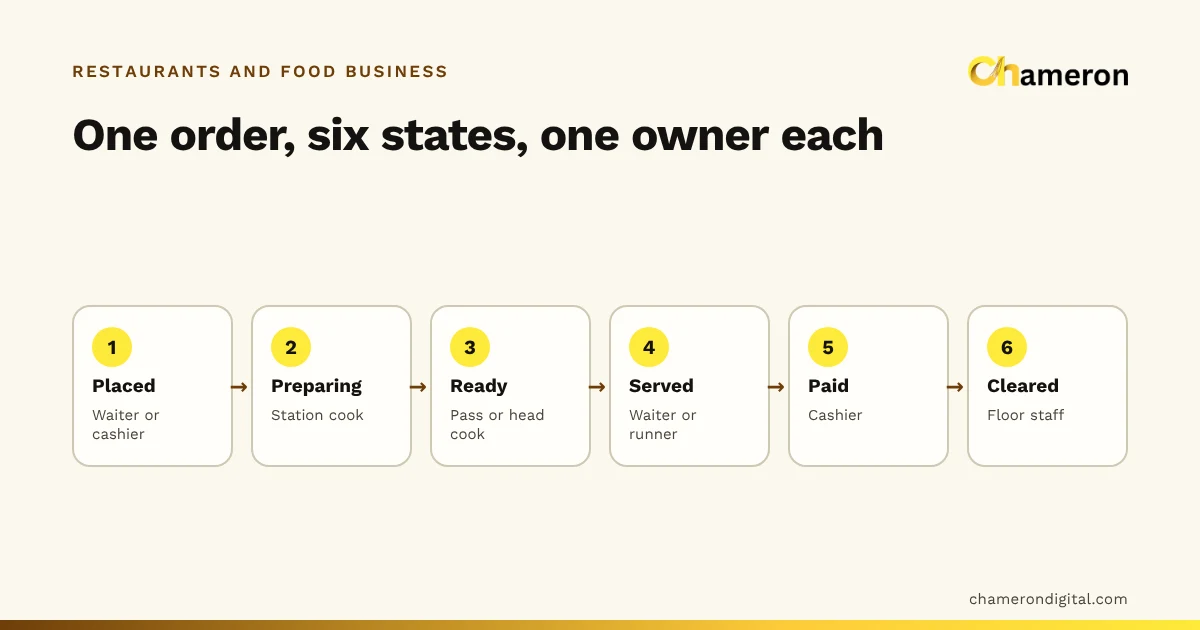
An order should always be in exactly one state that anyone on the floor can check. Here is a workable set for a dine-in restaurant, with the person who owns each one.
| State | Owner | What moves it on | What goes wrong without it |
|---|---|---|---|
| Placed | Waiter or cashier | Order sent to the kitchen | Order written down but never sent |
| Preparing | Station cook | Dish finished | Two cooks make it, or neither does |
| Ready | Pass or head cook | Picked up by a runner or waiter | Food waits under the lamp and goes cold |
| Served | Waiter or runner | Guest asks for the bill | Wrong table served, nobody knows |
| Paid | Cashier | Payment recorded against the bill | Bill paid but order left open, or the reverse |
| Cleared | Floor staff | Table cleaned and reset | Guests seated at a dirty table |
The names matter less than the rule: a state changes only when its owner says so. The kitchen marks food ready; the cashier marks it paid. If anyone can move an order anywhere, the board stops meaning anything.
Map the handoffs, not just the steps
Between the six states sit four handoffs. Write one rule for each, train it, and check it during service.
- Order-taker to kitchen. The order is not "placed" until the kitchen has it. Rule: the waiter sends it immediately, not after taking three more tables' orders.
- Station to pass. When a dish needs two stations (a tandoori platter with a curry from the main line), someone must bring the parts together. Rule: the pass checks the full ticket before calling it ready.
- Pass to guest. Ready food needs a runner. Rule: a named runner per section, and ready orders are picked up oldest first.
- Table to till. The bill must come from the order that was served, not from memory. Rule: the cashier prints the bill from the open order and nobody re-keys items.
How the flow changes by channel
Dine-in, takeaway, counter and delivery orders share one kitchen, so they should share one order list. The states are the same; the order in which money and food move is not.
| Channel | When payment is taken | When the kitchen starts | What closes the order |
|---|---|---|---|
| Dine-in (table service) | At the end | As soon as the order is placed | Payment, then the table is cleared |
| Counter or quick service | First, at the counter | After payment | Food handed over at the counter |
| Takeaway or parcel | First, or at collection | At placement, timed to the collection slot | Parcel handed over and checked |
| Own delivery (phone orders) | At the door or in advance | At placement | Rider confirms delivery and cash or UPI is accounted for |
Two practical points follow. First, takeaway and delivery need a packing step between ready and handed over: someone checks the parcel against the ticket, adds cutlery and chutneys, and seals it. Second, cash collected by riders needs its own end-of-shift check, because it reaches the till hours after the sale.
Route every item to its station
A kitchen with a tandoor, a main line, a bar and a dessert counter is really four kitchens. Each menu item should belong to one station, so the station sees only its own work and nothing is forgotten because it was on someone else's ticket.
Take table 7's order on a Friday evening:
| Item | Qty | Station |
|---|---|---|
| Paneer tikka | 2 | Tandoor |
| Butter naan | 2 | Tandoor |
| Dal makhani | 1 | Main line |
| Fresh lime soda | 2 | Bar |
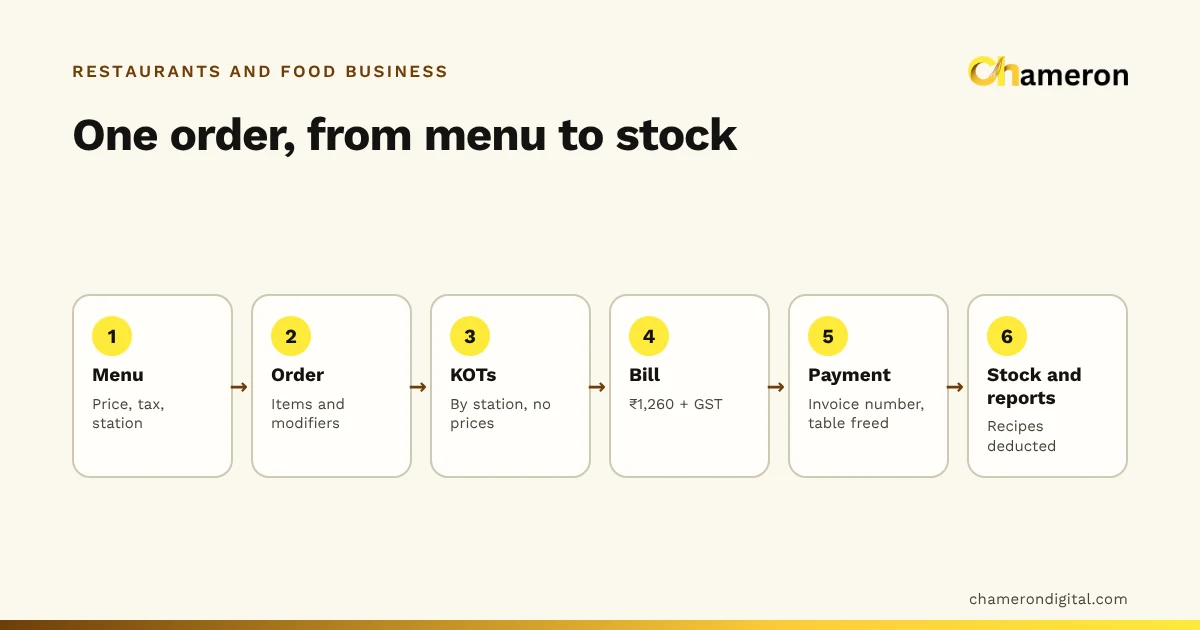
One order becomes three tickets: tandoor, main line and bar, each carrying the table number, the time sent and the KOT number, so the pass can match them up again. Notes such as "one paneer tikka less spicy" travel with the item they apply to, not at the bottom of the ticket where the cook may miss them. These choices are recorded as modifiers where possible, so they are never left to handwriting.
Courses and firing
If guests order starters and mains together, decide who controls timing. A common rule is that starters go straight to the stations, while mains are held and fired by the waiter when the starters are cleared. Without a rule, the dal arrives with the paneer tikka and sits going cold.
Changes after the order has gone
Orders change mid-service, and each kind of change needs a fixed response. The mechanics of how software records them are covered in how restaurant billing software works; the workflow decisions are yours.
| Change | Workflow rule |
|---|---|
| Guest adds an item | New ticket marked as an addition, same table, new time. The bill stays open. |
| Item cancelled before cooking | Waiter requests, manager approves, ticket marked cancelled at the station. |
| Item cancelled after cooking | Manager approves with a reason; the dish is recorded as waste, not quietly removed. |
| Dish sent back | Remake ticket with a reason; the original is recorded as waste. |
| Table moves | The order moves with it, so the open bill follows the guests. |
Recording waste with a reason matters beyond the night itself. It is what lets you see, at month end, why your food cost is higher than the recipes say it should be.
A worked example: table 7, start to finish
Here is the same order through the full workflow, with invented times.
| Time | State | What happened |
|---|---|---|
| 20:02 | — | Two guests seated at table 7 |
| 20:06 | Placed | Order taken; tickets sent to tandoor, main line and bar; mains held |
| 20:10 | Served | Drinks from the bar reach the table |
| 20:19 | Ready | Paneer tikka ready at the pass |
| 20:21 | Served | Starters served |
| 20:31 | Preparing | Waiter fires the mains as starter plates are cleared |
| 20:44 | Ready | Dal makhani and naan ready |
| 20:46 | Served | Mains served |
| 21:05 | Placed | Gulab jamun added: a new dessert ticket |
| 21:12 | Served | Dessert served; guests ask for the bill |
| 21:15 | Paid | Bill printed from the open order, split between UPI and cash |
| 21:16 | Cleared | Table marked for cleaning |
| 21:22 | — | Table reset and shown as available |
The tandoor ticket went at 20:06 and the starters were ready at 20:19, so it took 13 minutes. If the kitchen's target for tandoor starters is 15 minutes, that ticket was on time. The table was occupied from 20:02 to 21:22, 80 minutes in all, of which 6 minutes were spent resetting it. Those are the numbers behind table turnover, and they only exist if every state change is recorded with a time.
Watch ticket age, not ticket count
During a rush, ten tickets on the rail may be fine and three may be a problem, if one of the three has waited 25 minutes. What matters is how long the oldest ticket has been waiting.
- Set a target per station. A bar can turn a drink in a few minutes; a biryani on dum cannot be hurried. Agree realistic targets with your cooks and write them down.
- Stamp the time on every ticket. Printed or on a screen, the time sent is the most useful line on a ticket after the items.
- Keep tickets in time order. On paper, a rail where new tickets go on the right. On a kitchen display, a timer on each ticket.
- Review the slow ones weekly. Which station, which dish, which hour? The answer usually points at a prep or staffing problem rather than a slow cook. Our guide to restaurant operational efficiency covers how to fix the bottleneck once you have found it.
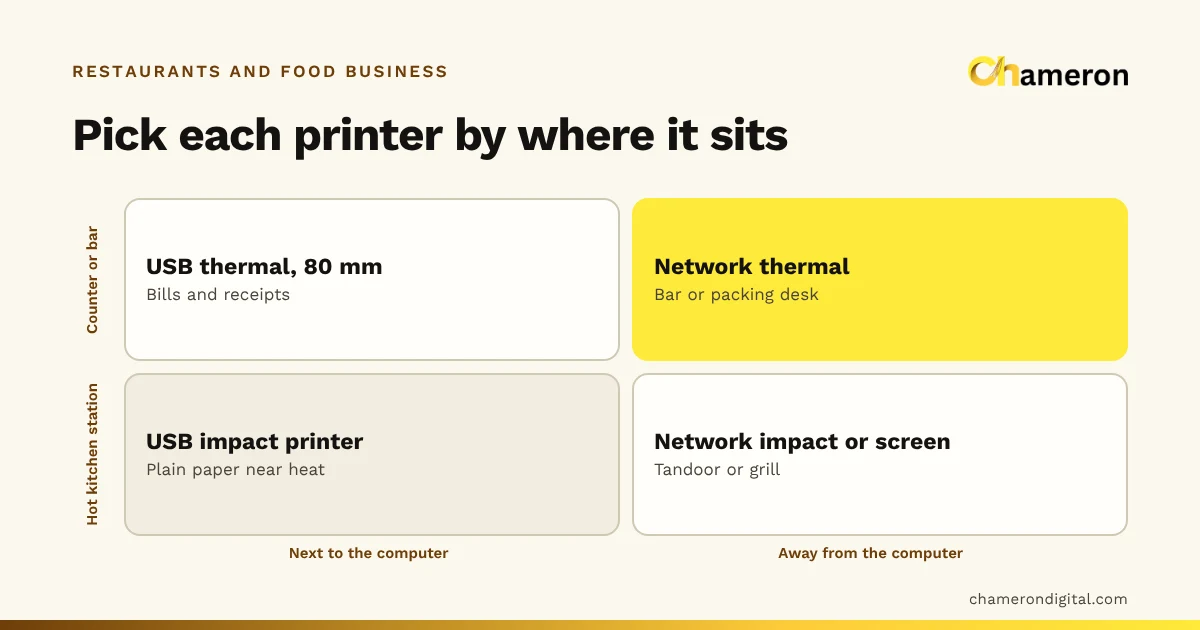
Paper KOTs need printers that keep up during a rush; the restaurant printer guide covers choosing and placing them.
Closing the order properly
An order is not finished when the food is eaten. Closing it cleanly protects your cash and your records.
- Bill from the order. The bill should be built from the items actually sent and not cancelled, so nothing is missed or charged twice.
- Record each payment method. If a table pays partly by UPI and partly in cash, record it as a split payment, so the day close shows both correctly.
- Close only after payment is confirmed. For UPI, the cashier checks the payment has actually arrived before closing the bill.
- Clear, then free. After payment the table goes to cleaning, and only then back to available.
- Check for open orders at day close. Any order still open at closing time is either unpaid or was never closed; both need an answer before the register is counted.
Common mistakes
- States nobody owns. If "ready" can be set by anyone, the board fills with food nobody is carrying.
- Separate queues per channel. A delivery order on a separate pad or tablet gets forgotten when the dining room is full.
- One ticket for the whole kitchen. The tandoor cook reads past the dal and the bar never sees the drinks. Split tickets by station.
- Reprinting the full order for an addition. The kitchen cooks the whole order twice. Send only the new items.
- Quiet cancellations. Removing a cooked dish without a reason hides waste and, sometimes, theft.
- Showing a table as free straight after payment. Guests get seated before the table is cleared.
- Re-keying the bill at the till. Every re-keyed bill is a chance to miss an item or change a price.
Running the workflow in software
Paper can run this workflow in a small restaurant, but it relies on people remembering to move every slip. Software helps by making the state the only way work moves. In DINE OS, for example, orders from dine-in, takeaway and delivery sit in one order hub and move from preparing to ready to complete, the kitchen display filters tickets by station with a timer on each, and the tables board sends a table to cleaning after payment rather than straight back to available. Whatever you use, write the workflow down first; software can enforce a process, but it cannot design one for you. Our restaurant software checklist lists what to test before you choose.
The bottom line
A good order workflow is simple to describe: six states, one owner for each, four handoffs with a rule, every item routed to its station and every ticket stamped with a time. Write it on one page, train it before the weekend rush, and review the slowest tickets each week. When an order goes wrong, you will know exactly which step and which handoff to fix.
Questions people ask
What is the correct sequence of a restaurant order?
Order taken and placed, sent to the kitchen station that prepares it, prepared, marked ready, served or handed over, billed and paid, and finally closed, with the table cleared before it is shown as free. In counter-service and takeaway formats, payment usually comes right after the order is placed instead of at the end.
Who should own an order in a restaurant?
Each stage should have one named owner: the waiter or cashier until the order is placed, the station cook while it is being prepared, the pass or runner until it is served, and the cashier until it is paid and closed. Shared ownership usually means no ownership during a rush.
How should a restaurant handle items added after the first order?
Send them as a new, separate kitchen ticket marked as an addition, with the table number and time, rather than reprinting the whole order. The bill stays open and collects both. See what a KOT is for what goes on each ticket.
Do takeaway and delivery orders need a different workflow?
They use the same states but in a different order: payment is often taken first, and the order closes when it is handed over rather than when a table is cleared. Keeping all channels in one order list lets the kitchen prioritise across them.
How do I know which orders are running late?
Stamp every kitchen ticket with the time it was sent, agree a target time for each station, and check ticket age, not ticket count. A kitchen screen with a timer on each ticket makes this automatic; with paper, a ticket rail in time order does the same job.