The short answer
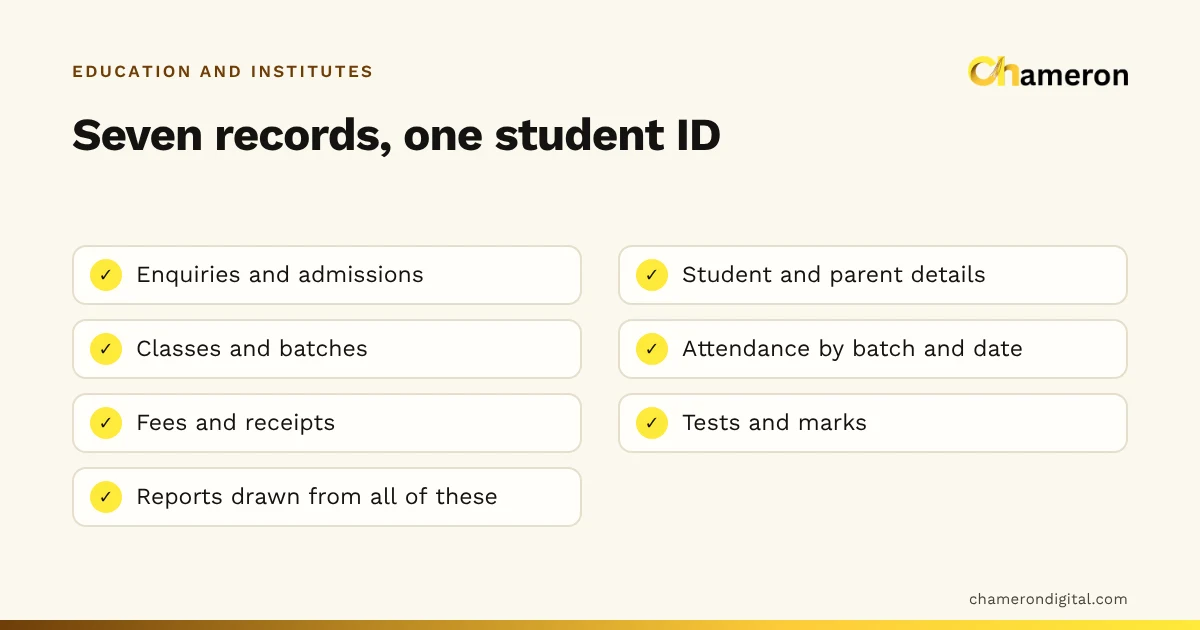
Institute management software is one system for the office side of a school or coaching centre. It records each student once, at admission, and links everything else to that record: the class or batch they attend, their attendance, the fees they owe and pay, and their test marks. Instead of an enquiry diary, an admission file, a fee register and a marks spreadsheet that never quite agree, the office works from one set of records and can answer a parent's question at a glance.
What the software actually does
Most institute management software is built around the same handful of records. The names vary between products, but the jobs do not.
| Area | What is recorded | The question it answers |
|---|---|---|
| Enquiries and admissions | Name, course of interest, contact, follow-up date, admission date | How many enquiries became admissions this month? |
| Student records | Student and parent details, student ID, documents received | What is this parent's phone number? |
| Classes and batches | Timings, teacher, room, students in each batch | Which batches still have seats? |
| Attendance | Present or absent, by batch and date | Who has missed three classes in a row? |
| Fees and receipts | Fee plan, instalments, payments, receipt numbers | Who is overdue, and what did we collect today? |
| Tests and marks | Marks by test and by student | How did the morning batch do in the last mock test? |
| Reports | Summaries drawn from all of the above | What do I tell the parent at the meeting? |
Linking is the point
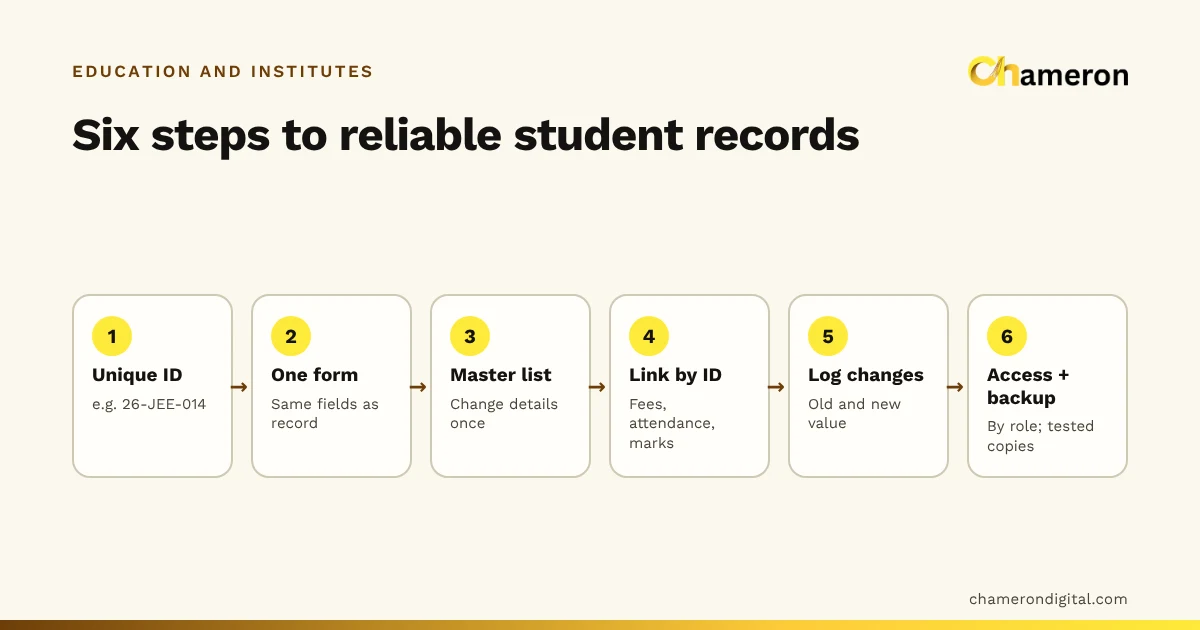
Each of these could be kept on paper. What software adds is the link between them. Take a student with the ID NEET26-031. When she pays her second instalment, the receipt is recorded against NEET26-031. Her attendance for the morning batch sits under the same ID, and so do her mock test marks. When her father calls to ask how she is doing, the office sees fees, attendance and marks together, without opening three registers and hoping the spelling of her name matches in each.
That single ID is also what makes reports possible. A list of overdue students, a batch's average attendance or the day's collection by payment mode are just questions asked of linked records. Our guide on how to manage student records covers how to set up that ID scheme even before you choose any software.
Coaching centres and schools need different things
The same word, "institute", covers very different offices. Before comparing products, be clear about which kind of office you run.
| Coaching centre | School | |
|---|---|---|
| Intake | Rolling admissions, several intakes a year | One academic year, a main admission season |
| Grouping | Batches by course, timing and level; a student may join two batches | Classes and sections |
| Fees | A course fee paid in instalments, with discounts and scholarships | Monthly or term fees split into heads such as tuition, transport and exams |
| Assessment | Frequent tests and mock exams | Unit tests, term exams and report cards |
| What parents ask | Is my child attending and improving? | Attendance, marks and fees in one report |
| Office size | Often one or two people doing everything | Dedicated office staff and an accountant |
A coaching centre will feel most of the benefit in enquiries, batch strength and instalment tracking. A school will lean on class-wise attendance, fee heads by term and report cards. Software built only around one model can feel awkward in the other, so test it with your real structure, not a demonstration dataset.
Signs your institute has outgrown registers
Registers are not wrong. Plenty of institutes run well on them. The trouble starts when cross-checking takes longer than recording. Watch for these signs:
- The same student's phone number is written in three places, and the three do not match.
- Answering "how much is due this month?" takes an afternoon with a calculator.
- Receipts are issued, but nobody can quickly say which instalment a receipt belongs to.
- Admission season leaves a pile of forms that takes weeks to copy into registers.
- Absentee follow-up depends on a teacher remembering to mention it.
- Only one person understands the fee register, and the office stalls when they are on leave.
Scale makes these worse. Picture a coaching centre with 240 students in 8 batches, each student paying in 3 instalments. That is 720 instalments a year to track, each with its own receipt. If each batch meets on about 24 days a month, the office also handles roughly 192 batch attendance sheets every month. A register can hold all of that. What it cannot do is tell you, without a recount, which of those 720 instalments are late and whether those students have also stopped attending.
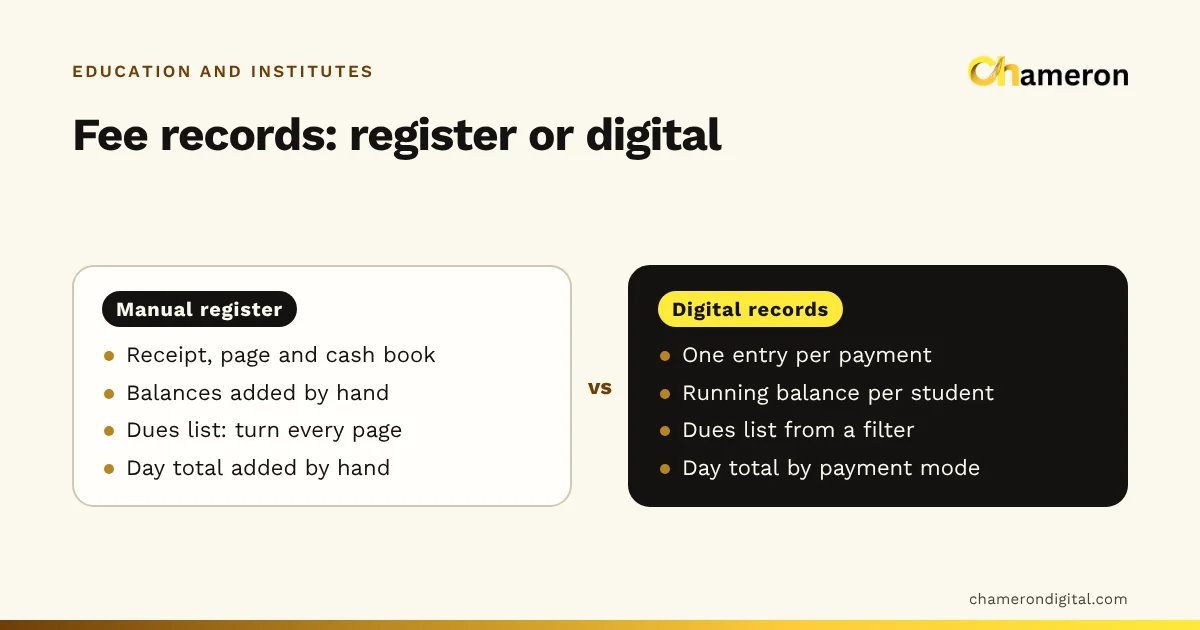
For a closer look at the trade-offs, read manual registers vs digital fee records and the broader comparison of business software vs spreadsheets.
What to look for when choosing
Start from how your office works, not from a feature list. These are the points that matter most for a school or coaching office:
- One student ID linking everything. Fees, attendance and marks should all sit under the same record.
- A fee structure that fits yours. Instalments, fee heads, discounts, scholarships and partial payments should be recorded properly, not squeezed into a note field.
- Numbered receipts. Reprints should be possible, and cancelled receipts should stay on record with a reason rather than disappear.
- Batches or classes the way you teach. If a student can attend two batches, check that the software allows it.
- Quick attendance. If marking a batch takes longer than a register, teachers will go back to the register.
- Reports you will actually use. A dues list, the day's collection by mode, batch strength and attendance summaries.
- Access control. Separate logins, so the front desk, accounts and teachers each see what they need.
- Backups and exports. You should be able to back up your data and export it to a spreadsheet.
- A fit with your connection. Decide between an installed and a cloud setup based on your internet and who needs access; see offline vs cloud software.
- Training and support for the office staff who will use it every day.
Ask any supplier to walk through your own fee plan, with one student paying an instalment late and in two parts. That one test shows more than a long feature list. Our software selection checklist and guide on choosing business software help you compare options side by side.
Getting ready to switch
Most of the work of moving to software happens before you install anything.
- Write down the fee structure. Every course or class, its fee, its instalments and due dates, and your discount rules.
- Clean the student list. Remove duplicates, correct names and give every student a unique ID.
- Fix opening balances on one date. A student who owes ₹6,000 on 1 June enters the new system with ₹6,000 due, and the register is closed for that student at that point.
- Pick a calm start date. The start of a new batch or term is natural, but set things up a few weeks before admission season, not in the middle of it.
- Run both for a month. Keep the receipt book and register alongside the software and compare the day's totals each evening.
- Train with real tasks. Have staff admit a student, take a fee and mark attendance, rather than watching a demonstration.
If you are not ready for software, a shared fee collection tracker builds the same habits: one row per student per fee period, with a receipt number for every payment.
Common mistakes
- Choosing on features, not workflow. A long list of modules does not help if fee collection at the window takes longer than before.
- Moving messy data. Duplicate students and wrong balances become harder to spot once they are inside a system.
- Giving everyone full access. Not every staff member needs to see every parent's details or edit fee records.
- Skipping backups. Whether data sits on an office computer or online, know where the copies are and test that you can restore them.
- Expecting software to collect fees. It can show who is overdue. Someone still has to call the parent.
Student data and privacy
Admission forms hold names, dates of birth, addresses and parents' phone numbers, so treat them with care. Collect only what you need, limit who can see and change records, and keep backups in a safe place. Rules on handling personal data change, so check the current requirements for your institute with a professional. Our guide to managing student records sets out a simple access and backup plan.
Where EDU OS fits
Chameron Digital's EDU OS is intended for this kind of office: admissions, attendance, fees and exams for a school or coaching office. It is not yet generally available, so please ask about availability if it interests you. Our page for schools and coaching institutes explains how we think about the education office.
The bottom line
Institute management software is not a different way of teaching. It is a tidier way of running the office around the teaching: one student, one ID, and every fee, attendance mark and test score linked to it. Decide what your office needs, clean up your student list and fee structure first, and judge any system by how it handles your real day, from a walk-in enquiry to a part-paid instalment.
Questions people ask
Is institute management software the same as a school ERP?
The terms overlap. "ERP" usually suggests a larger system that may also cover accounts, payroll, transport or a library. A small institute normally needs the core office records first: admissions, attendance, fees and marks.
Can a small coaching centre manage with spreadsheets instead?
Yes, if one person keeps them carefully and backs them up. A spreadsheet such as our fee collection tracker is a sensible first step. The limits show up when several people edit the same file or you need fees, attendance and marks to agree.
Should institute software be installed on a computer or run in the cloud?
It depends on your internet connection and who needs access. An installed system keeps working when the connection drops; a cloud system is easier to reach from several places. Our guide to offline vs cloud software explains the trade-off.
Does institute software handle GST on fees?
Whether GST applies to an institute's fees depends on the kind of course or service and on current rules, so check with your accountant. If it does apply to you, make sure the software can show it correctly on receipts or invoices before you rely on it.
Can parents see their child's records?
Some systems offer a parent view; many institutes simply share a printed or exported summary. Decide what parents actually need, usually attendance, marks and fee status, and confirm what a product really offers before you count on it.