The short answer
In a supermarket, billing and inventory are the same system seen from two ends. Every bill takes stock out, every delivery puts it back, and both read one product master holding each item's barcode, price, cost, tax and unit. When those records are shared by every counter and every movement is billed or recorded, the stock figure, the cash in the drawer and the margin reports agree. When they are not, the store runs on guesswork.
How a bill becomes a stock movement
Follow one basket through counter 2 on a Saturday evening:
| Item | Sold | Stock before | Stock after |
|---|---|---|---|
| Sugar 1 kg packet | 2 | 140 | 138 |
| Tea 500 g | 1 | 36 | 35 |
| Tomatoes (loose, kg) | 0.75 kg | 42.5 kg | 41.75 kg |
| Shampoo 180 ml | 1 | 24 | 23 |
The cashier scans three items and enters the weight of the tomatoes. When the bill is completed, four stock records change at once, the sale is recorded against the payment method, and the margin on each line is known because the cost is on the item. Nobody writes anything into a stock register.
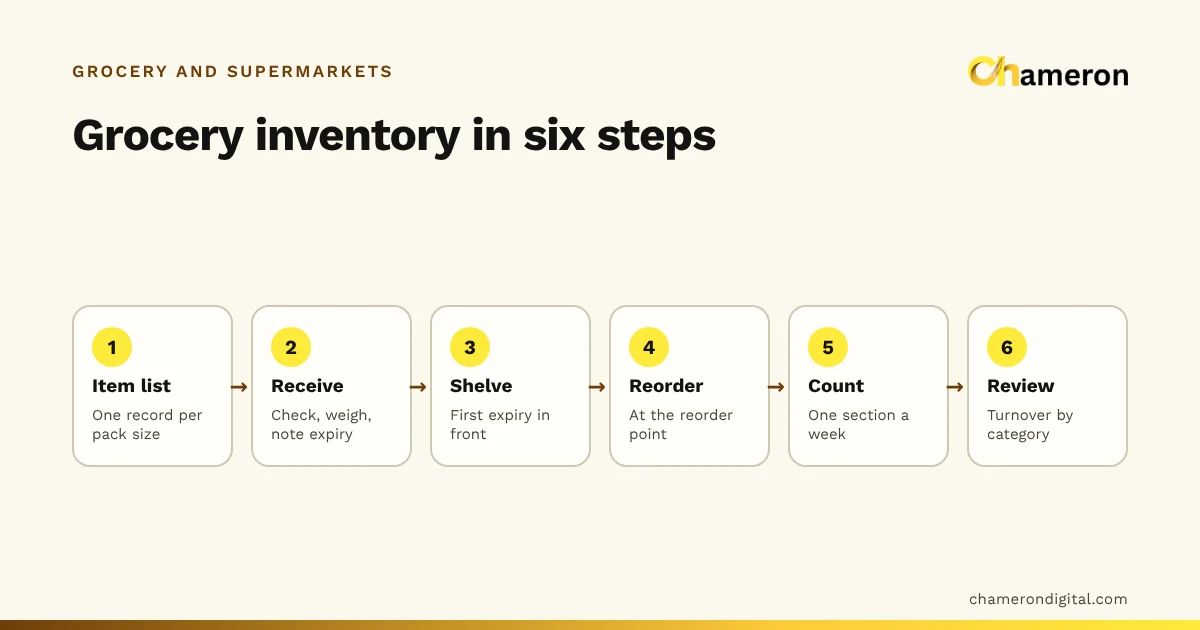
This only works if two conditions hold. First, every item that leaves the store goes through a bill or a recorded adjustment: free items, wastage, staff purchases and samples included. Second, every item that enters is received against a record, with its cost. Our grocery inventory guide covers the receiving routine; this guide concentrates on the counter and what flows from it.
The product master: one record that both sides read
The product master is the list of everything you sell. The counter reads it to price a bill; the stock side reads it to value and reorder. Each item needs:
| Field | Why it matters at the counter | Why it matters for inventory |
|---|---|---|
| Name and SKU | Search by name when a barcode will not scan | One identity across purchases, sales and counts |
| Barcode | One scan adds the right item | Receiving can be scanned too |
| Unit (piece or kg) | Weight or quantity is asked for correctly | Stock counted in the same unit it is sold in |
| Selling price and MRP | The right price on every bill | Stock value at selling price |
| Cost price | Not shown to the shopper | Margin, stock value at cost, below-cost alerts |
| GST rate and HSN code | Correct tax on the bill | Correct tax on purchases |
| Batch and expiry (where relevant) | Not usually shown | First-expiry-first selling and near-expiry lists |
| Reorder level and supplier | Not shown | The reorder list for each supplier |
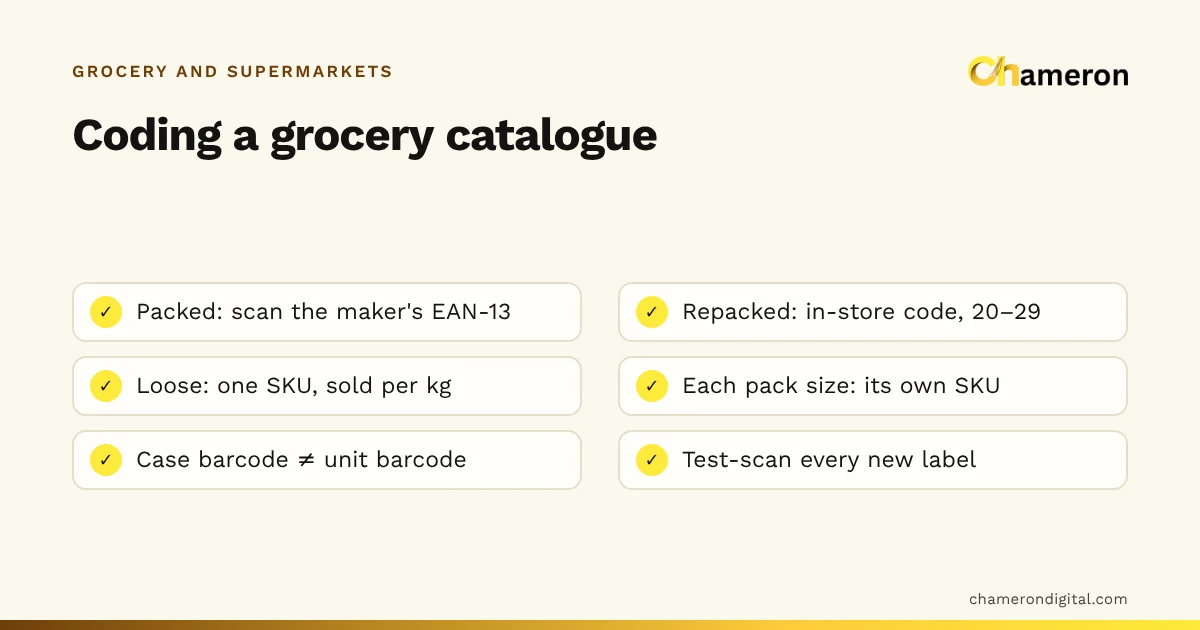
A supermarket has thousands of these records, so set them up carefully once and give one person the job of keeping them right. Codes for packed, repacked and loose goods are covered in grocery barcodes and SKUs, and the general method in our SKU naming guide.
At the counter: fast, but accurate
The evening queue is the test of a supermarket's billing. A few practices keep it moving without losing accuracy:
- One price list and one stock figure for all counters. Every counter bills against the same records, so a price changed in the morning is right everywhere by opening time.
- Scan first, search second, type last. Packed goods are scanned. Loose items are found by a short code or a quick key and weighed. Typing a price by hand should be rare and should need a manager.
- Hold, do not cancel. When a shopper goes back for one more item, park the bill and serve the next person. A held bill keeps its items, so nothing is re-scanned.
- Record payments as they were made. Cash, UPI, card or a split payment across them, so the cash in the drawer can be checked against the bills.
- Plan for a lost connection. Ask what your software does if the network or internet fails mid-rush, and test it before a festival weekend.
How barcode billing works explains what happens between the scan and the receipt in more detail.
Prices, MRP, offers and GST
Supermarket pricing has rules that a general retailer meets less often.
MRP is a ceiling. The maximum retail price printed on a pack is the most the shopper can be charged. You can sell below it, and many stores do on fast movers. When a new delivery arrives with a different MRP from the stock already on the shelf, keep the batches apart, or the cheaper old stock may be billed at the new price.
Offers must move stock correctly. A "buy 2 get 1 free" offer is three units out of stock, not two. Bill all three and show the free one as a discount. The same goes for free gifts packed with another item, if they are stocked separately. Before running a discount, check what it does to the margin with the discount calculator.
GST belongs in the price, not in the margin. Shelf prices usually include GST, but margins should be worked out on prices before GST on both the sales and the purchase side. If you need to split an inclusive price, see how to calculate GST from an inclusive price. Rates change, so confirm them with your accountant or the official GST portal.
Returns, exchanges and damaged stock
Stock that comes back to the store needs the same discipline as stock that goes out.
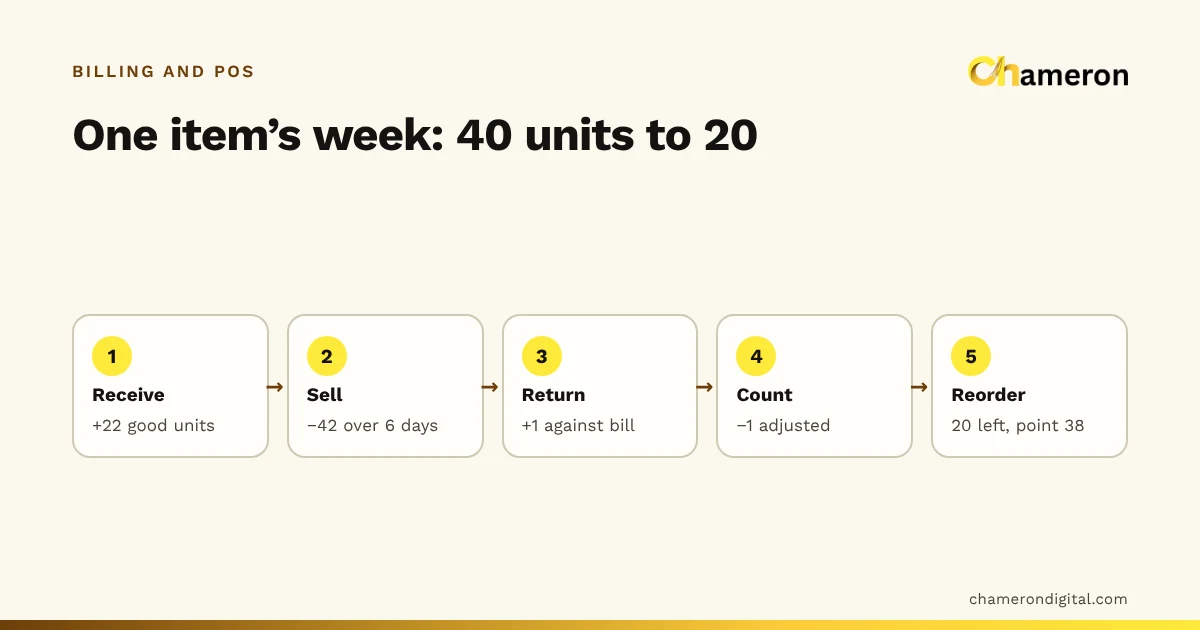
- Customer returns go back to saleable stock only if the item is sound and in date. Anything else is recorded as damaged, so it is not counted as sellable.
- Exchanges are made against the original bill, so the returned item and the replacement are both recorded and the tax on each is correct.
- Damaged or expired stock found on the shelf is written off with a reason, or set aside for return to the supplier under your trade terms. A supplier return is usually documented with a debit note that reduces what you owe.
Unrecorded returns and write-offs are a common source of the gap between the stock on screen and the stock on the shelf, which ends up reported as shrinkage.
Closing the day: cash and stock
A supermarket should close every day with a short, fixed routine.
A small difference may be a wrong change or a UPI payment recorded as cash; investigate it the same day while the cashier remembers. The float and cash drawer shift entries in our glossary explain the terms.
Then spend five minutes on the stock side: bills cancelled after printing, prices typed by hand, items sold below cost and any stock that went negative. Each one points to a mistake in the product master or at the counter, and is easier to fix the same day.
Reports a supermarket should read
Good billing records produce useful reports without extra work. Read them on a fixed rhythm:
| How often | Report | The question it answers |
|---|---|---|
| Daily | Sales by payment method; cash difference | Did the day's money arrive? |
| Weekly | Reorder list by supplier; near-expiry stock | What do we order, and what must move? |
| Weekly | Count differences from cycle counts | Where is stock going missing? |
| Monthly | Margin by department | Which shelves earn their space? |
| Monthly | Dead stock; average bill value | What to clear, and are baskets growing? |
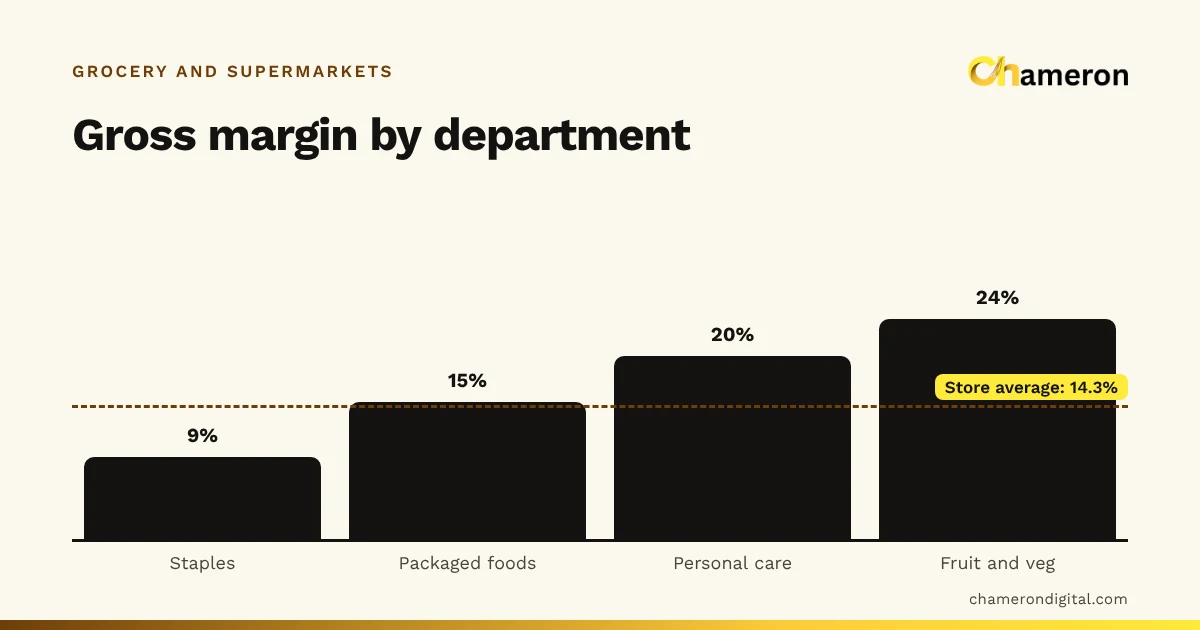
The monthly margin view is the one most stores skip. Here is an invented month for one store, with sales and cost of goods sold before GST:
| Department | Sales | Cost of goods sold | Gross profit | Margin |
|---|---|---|---|---|
| Staples | ₹6,00,000 | ₹5,46,000 | ₹54,000 | 9% |
| Packaged foods | ₹4,00,000 | ₹3,40,000 | ₹60,000 | 15% |
| Personal care | ₹2,50,000 | ₹2,00,000 | ₹50,000 | 20% |
| Fruit and vegetables | ₹1,50,000 | ₹1,14,000 | ₹36,000 | 24% |
| Store | ₹14,00,000 | ₹12,00,000 | ₹2,00,000 | 14.3% |
Staples bring in the most sales but the least margin; they draw shoppers in. Fruit and vegetables show the highest margin on paper, but only if wastage is recorded: if it is not, the cost of thrown-away produce hides in the next stock count. The margin and markup calculator and our question on how to calculate profit margin cover the arithmetic.
Average bill value is simpler: sales divided by the number of bills. ₹1,26,000 from 840 bills is ₹150 per bill. Tracking it each month shows whether offers and displays are adding items to baskets; see what is average bill value.
Common mistakes
- Separate item lists at each counter. Prices and stock drift apart, and counts never reconcile.
- Free items handed over without a bill. Every offer sold leaves stock records one unit too high.
- Mixing old and new MRP stock on one record, so the wrong price is charged on one of them.
- Prices typed by hand as routine. Each one is a chance for a wrong price and a hole in the margin report.
- Wastage thrown away without being recorded, especially in fresh produce, dairy and bakery.
- Reading only the total sales figure. Department margins and the reorder list are where decisions come from.
Choosing software for a supermarket
When you compare systems, test them against the routines above rather than a feature list. Can every counter bill against one set of records? How does it handle loose items, batches and expiry, held bills and split payments? What happens when the network drops? Can the reports you need be exported for your accountant? Our software selection checklist turns these into questions to ask.
For barcode retail today, BILL OS bills across several counters against one set of records, with held bills, split payments, batches and expiry, supplier accounts and reports by product and margin. GROCERY OS is our product for grocery stores and supermarkets, covering fast counters, loose and packed items, deliveries and reorder lists. It is not yet generally available, so ask about availability. The supermarkets page describes both.
The bottom line
A supermarket that treats billing and inventory as one system knows, every evening, what it sold, what it holds, what it made and what to order. That takes a clean product master shared by every counter, every movement recorded (offers, returns and wastage included), a fixed day close and a monthly look at department margins. None of it is complicated; the work is in doing it every day.
Questions people ask
Can every counter in a supermarket use the same stock?
It should. When all counters bill against one set of records, an item sold at counter 3 is immediately out of stock for counter 1, and a price changed once applies everywhere. Avoid setups where each counter keeps its own copy of the item list.
How should a buy-2-get-1-free offer be billed?
Bill all three items so stock goes down by three, and show the free one as a discount. If the free item is handed over without being billed, stock records will show one more than the shelf for every offer sold.
What happens to billing if the internet goes down?
That depends on the software. Installed software that runs on a computer in the store can keep billing without internet; cloud software may not. See does billing software work without internet.
Should supermarket prices include GST?
Prices shown to shoppers usually include GST, while margins should be worked out on prices before GST. Our guide to GST-inclusive and exclusive pricing explains both views; check rates with your accountant.
Which supermarket reports matter most?
Daily: sales by payment method and the cash difference. Weekly: the reorder list, near-expiry stock and count differences. Monthly: margin by department, dead stock and average bill value.