The short answer
Billing and inventory software work together by sharing one product record and one stock figure. Each completed bill takes the items sold out of stock, each delivery received adds to it, and returns, damage and stock counts correct it. The result is a stock number you can trust without a separate register, and reorder suggestions based on what actually sold rather than on memory.
One product record, used at the counter and in the stockroom
The link starts with the product list, sometimes called the item master. When a product is created once and used by both billing and stock, the counter and the stockroom are always talking about the same thing.
| Field | What billing uses it for | What inventory uses it for |
|---|---|---|
| SKU and barcode | Finding the item with a scan or search | Knowing exactly which item moved |
| Selling price | Pricing the bill | Valuing stock at selling price, if needed |
| Cost price | Margin on the bill | Stock value and profit reports |
| GST rate and HSN | Tax on the bill | Input tax on purchases |
| Unit (piece, kg, box) | Quantity on the bill | Quantity on hand |
| Size and colour | Billing the exact variant | Stock per variant |
| Reorder level | Not used | Flagging low stock |
The most important rule follows from this table: every item sold must exist as a product. If a cashier bills a shirt as "Misc ₹699", the money is recorded but stock never moves, and the shirt that left the shop is still sitting on the screen. Clear SKUs and scannable barcodes make this easy to keep to; our guide to how barcode billing works explains the counter side.
Every transaction moves stock
In connected software, stock is not a number someone types in. It is the running total of every movement, recorded in a stock ledger. These are the movements that matter in a typical shop:
| Event | What happens on the billing side | Effect on stock |
|---|---|---|
| Delivery received against supplier's bill | Purchase and cost recorded | Good units added |
| Damaged units in a delivery | Set aside, often returned to supplier | Not added to saleable stock |
| Sale completed | Bill printed and paid | Items taken out |
| Sale cancelled | Bill cancelled with a reason | Items put back |
| Customer return or exchange | Recorded against the original bill | Returned item back in, replacement out |
| Return to supplier | Recorded with a debit note | Units taken out |
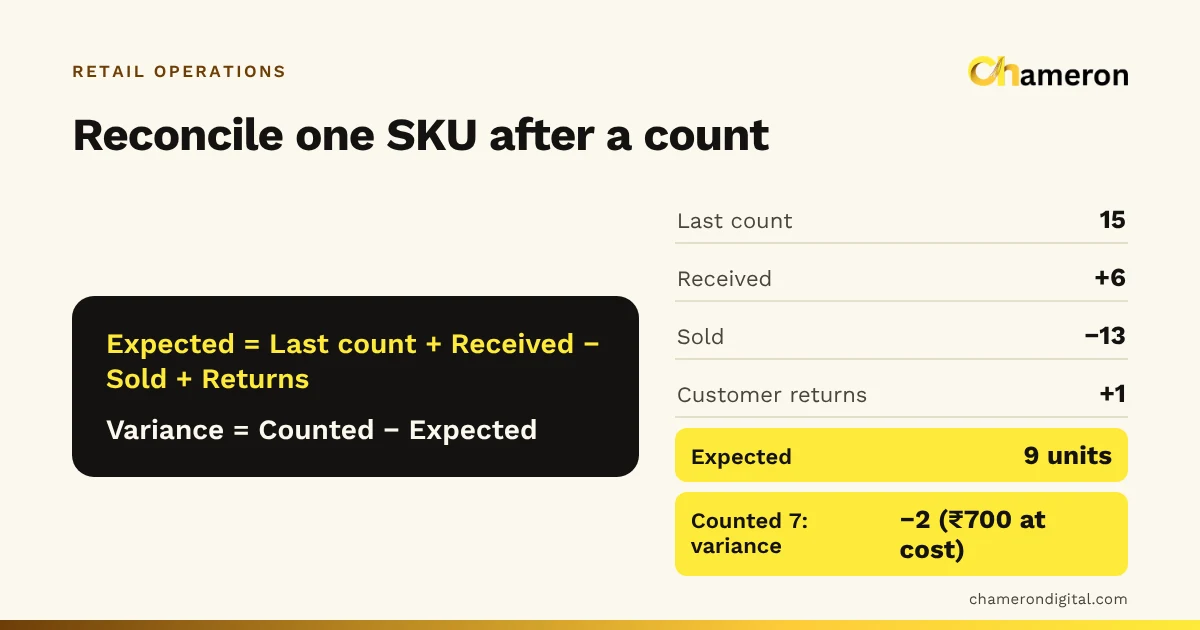
| Stock count | Not on a bill | Difference adjusted, with a reason |
| Transfer between stores | Not on a bill | Out of one store, into another |
Two things make this reliable. First, each movement is recorded once, at the moment it happens, by the person handling it. Second, nobody "corrects" stock by overwriting the figure: a count creates an adjustment with a reason, so the history explains itself.
A week in the life of one item
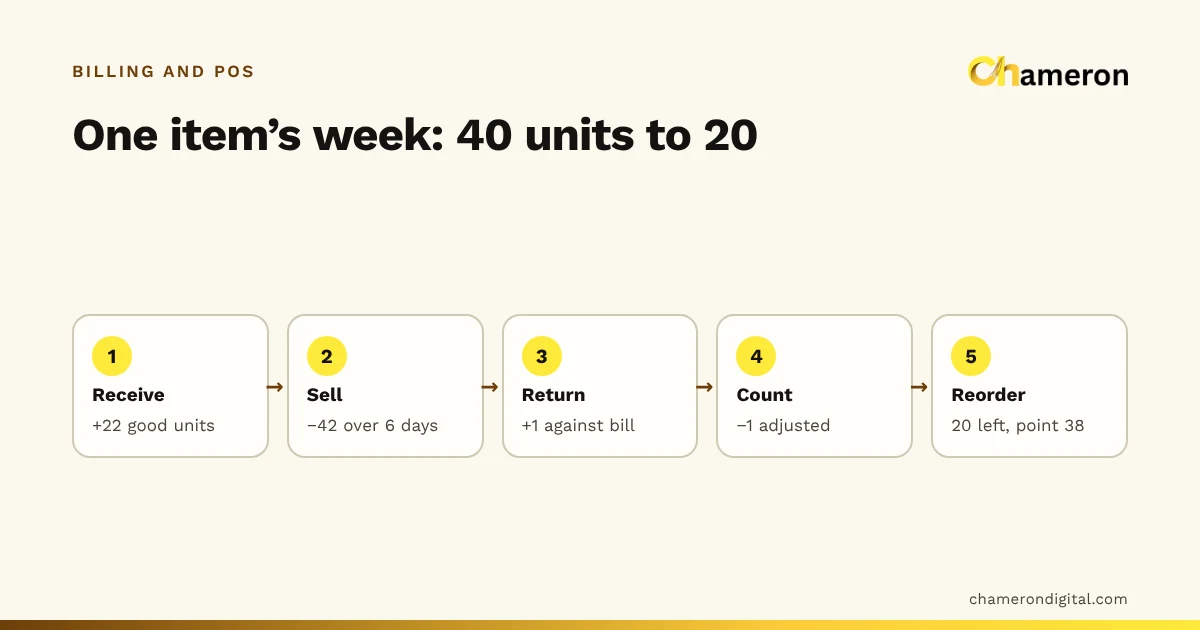
Here is how one product moves through a week in a housewares shop: a 1-litre steel water bottle, SKU BTL-STL-1000, cost price ₹180 each.
| Day | Event | Movement | Stock after |
|---|---|---|---|
| Monday morning | Opening stock | 40 | |
| Monday | 24 received; 2 dented, set aside | +22 | 62 |
| Monday to Wednesday | Sold on 18 bills | −18 | 44 |
| Thursday | One returned unused, against its bill | +1 | 45 |
| Friday | Sold | −10 | 35 |
| Saturday | Sold | −14 | 21 |
| Saturday evening | Shelf count finds 20 | −1 | 20 |
Check it with the stock equation: 40 + 22 − 42 + 1 − 1 = 20. The ledger and the shelf agree because the one missing bottle was recorded as an adjustment, not quietly overwritten.
Look at what the shop now knows without anyone adding anything up:
- Sales rate: 18 + 10 + 14 = 42 bottles in six days, an average of 7 a day.
- Stock value: 20 × ₹180 = ₹3,600 at cost.
- Supplier claim: 2 dented bottles × ₹180 = ₹360 to recover with a debit note.
- Shrinkage: one bottle (₹180) that cannot be explained, worth watching if it repeats. Our page on shrinkage in retail explains the usual causes.
With a bill book and a separate stock register, each of those figures would need someone to go through the week's bills by hand.
From sales history to a reorder list
The biggest practical benefit of linking billing and stock is that the reorder list writes itself. Because every sale is recorded against the product, the software knows how fast each item sells, and it can compare that with what is left.
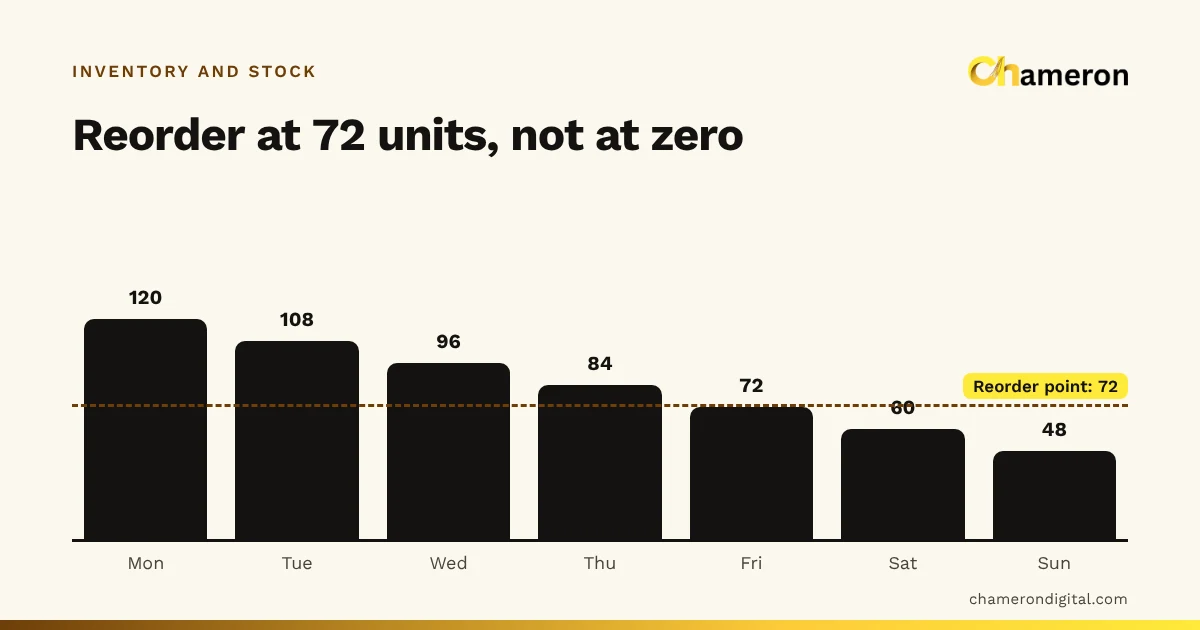
For the steel bottle, the supplier takes 4 days to deliver and the owner wants a cushion of 10 bottles for busy days:
7 × 4 + 10 = 38 bottles
On Friday evening stock fell from 45 to 35, below 38, so the bottle would have appeared on the low-stock list then. Ordered on Friday, the delivery would arrive around Tuesday with bottles still on the shelf, even after a busy Saturday. If nobody acts until Saturday night, the 20 left last about three days at 7 a day, while the supplier needs four: the shop runs out before the delivery comes.
How much to order is a separate decision. If the owner wants two weeks of cover, that is 7 × 14 = 98 bottles; if the supplier packs 24 to a carton, four cartons (96 bottles) is the sensible order. Try your own figures in the reorder point calculator, and read more about the cushion in what safety stock is and the full guide to reorder points.
What a connected system tells you that separate records cannot
Once sales and stock live in the same records, several useful reports come almost for free:
- Margin by item and category. The cost comes from the delivery, the price from the bill. See profit margin vs markup for how to read the figure.
- Dead stock. Items with stock on hand but no sales for, say, 90 days. Money is sitting on the shelf; our page on dead stock explains what to do with it.
- Stock value. Quantity on hand multiplied by cost, item by item, as of today rather than as of the last count. The method is in how to calculate stock value.
- Stock turnover. How many times stock is sold and replaced in a period. You can check a category with the inventory turnover calculator.
- Sizes and colours. For clothing and footwear, which variants sell and which sit. This only works if each variant is a separate product; see size and colour variants.
When billing and stock are kept separately
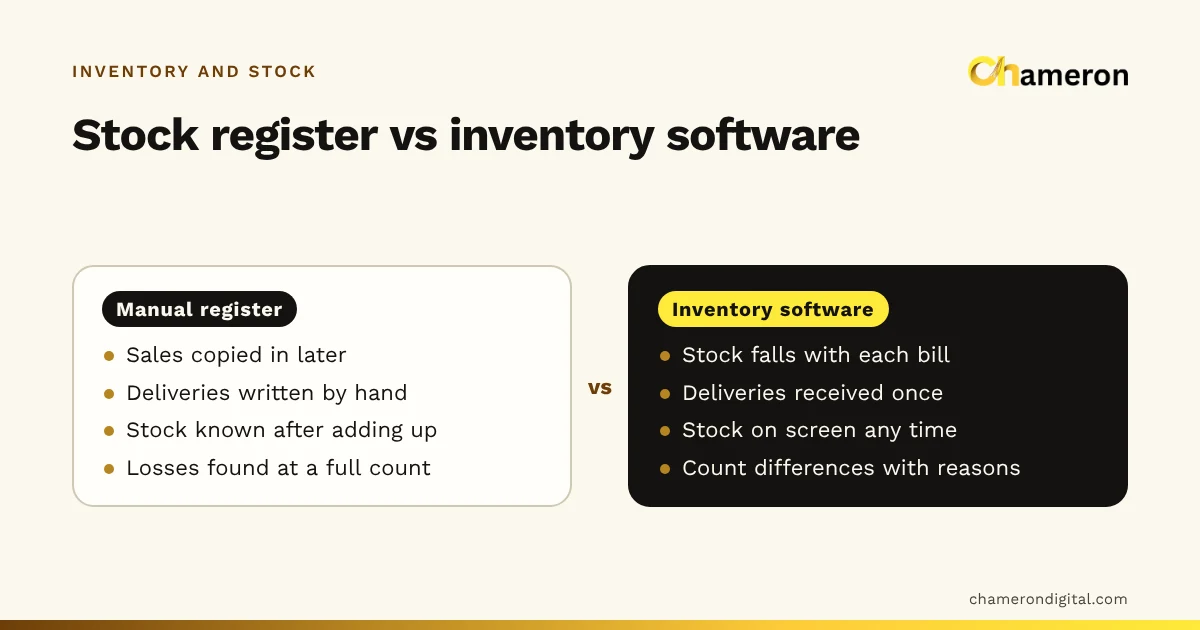
Many shops start with billing in one place and stock in another: a billing app plus a stock register, or a bill book plus a spreadsheet. It can work for a few dozen items, but the gaps are predictable.
| Separate records | Connected software | |
|---|---|---|
| Recording a sale in stock | Someone copies it later | Happens as the bill completes |
| Stock figure during the day | Yesterday's, at best | Current |
| Reorder list | From a walk around the shelves | From sales rate and stock on hand |
| Finding a difference | Compare two books by hand | Look at the item's movements |
| Effort as the shop grows | Grows with every bill | Mostly unchanged |
The weakest point is the copying. If 120 bills a day each need their items transferred to a register, the register will fall behind on the busiest days, which are exactly the days the numbers matter. Our comparison of manual inventory and inventory software goes into the trade-offs in more detail.
Common mistakes that break the link
- Billing under a generic item. "Misc", "Others" or "Cloth item" bills keep the cash right and the stock wrong. Create the product, even if it takes a minute at the counter.
- Shelving deliveries before receiving them. Stock sells before it exists in the system, figures go negative and margins are calculated without a cost. Receive first, shelve second.
- One product for all sizes. If a shirt in four sizes is one product, the screen can say "12 in stock" while the size customers want is gone.
- Overwriting stock figures. Typing a new number hides why it changed. Use a count adjustment with a reason, such as damaged, not found or found extra.
- Refunds as negative bills. A refund typed as a minus amount may return money without returning stock. Take returns against the original bill.
- Never counting. Even perfect billing cannot see theft, damage or a wrong scan. Count a few shelves every week; the stock count sheet helps.
How this works in BILL OS
In BILL OS, sales, returns, receiving and counts all go through one stock ledger. Deliveries are received against the supplier's bill with damaged units set aside, and a stock tally lets you count the shelves and then approve the differences with a reason. Reports include a reorder list and dead stock. The inventory and stock feature page describes each step.
The bottom line
Billing and inventory belong together because they describe the same events from two sides: money in at the counter, goods out of the shop. When one product record and one stock ledger serve both, the stock figure stays current, differences can be traced and reorder lists come from real sales. The discipline that makes it work is simple: create every product, receive every delivery, take returns against bills and count regularly.
Questions people ask
Does stock go down when an item is added to the bill or when the sale is completed?
In most systems stock moves when the sale is completed, not while the bill is being built or is on hold. Check how your software treats held and cancelled bills, because that decides what the stock screen shows during a busy hour.
What does negative stock mean?
It means the system has recorded more sales than it has stock for. Usually a delivery was put on the shelf but never received in the software, or the wrong variant was billed. Find the cause rather than simply typing in a new figure.
If the software tracks every sale, do I still need to count stock?
Yes. Software only knows about movements someone recorded. Theft, damage, wrong scans and unrecorded deliveries all show up only when you count. Regular partial counts are easier than one big annual count; see our stock count and reconciliation guide.
Can I start billing before I have entered all my opening stock?
You can, but stock figures for those items will be wrong until you do. A practical approach is to enter opening stock for your fast-moving items first, then count and enter the rest shelf by shelf over the following weeks.